Simple Regression with Breakout Rooms
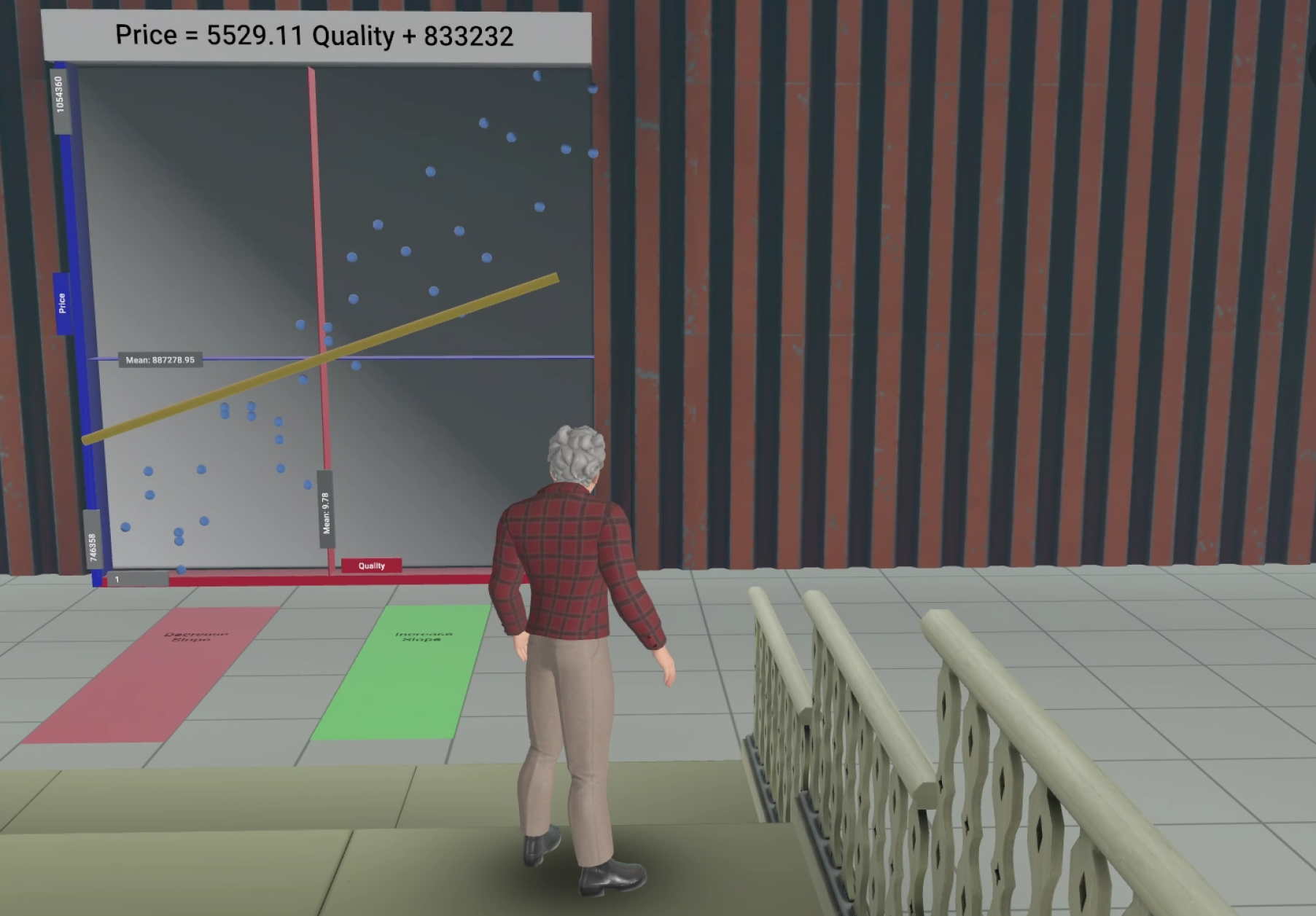
The Simple Regression VR app immerses students and instructors in a shared virtual environment for interactive data analysis. Within a warehouse‑like space featuring bleachers and a 3D diagram, participants manipulate a regression line by stepping onto color‑coded pads and observe real‑time updates to the corresponding equation.
The instructor guides students to interpret and adjust model parameters. Students then pass through a virtual door into breakout rooms in groups of four. In the breakout room they apply their skills under timed conditions.
The activity concludes with a cohort‑wide debriefing session. The app supports both classroom and online delivery with integrated voice and visual communication. It fosters collaboration and experiential learning. The app provides several educational benefits: Immediate visual feedback strengthens conceptual understanding Small‑group VR breakout rooms promote peer learning and active participation. The combination of visual, auditory, and kinesthetic interaction supports multiple learning styles.
A 2D browser simulation is available as a browser app. It requires a free Meta account. The avatar can be controlled with the keyboard arrow keys and the mouse. Although, not as immersive as the 3D app, the browser app is fully functional:
Using the VR App
Starting Simple Regression World in VR
Since the Simple Regression app is part of Meta Horizon Worlds it is technically a “World” rather than an app.
When using the Meta Quest headset students need to start Meta Horizon Worlds, which they can find in the Library under Applications. It is titled “Worlds”.
After starting the “Worlds” application students get teleported to the “Welcome Island” where they find a big selection of different world. When searching for “simple regression” the Simple Regression app shows up and after starting the app (start “Simple Regression” not Simple Regression (Breakout Rooms) or Simple Regression (Debriefing)).
When the teleporting is completed they will find their co-students (up to 14)and the instructor in a small auditorium. Everybody can talk to everybody using their Meta Quest headsets. This is true in the classroom and also when students are in various locations of the real world.
Technical Preparations
The instructor should familiarize the students with how to use the Meta Quest controllers. Especially, how they can move in the virtual reality and how they use the controller like a mouse to select.
Students should be asked if they have health conditions that prevent them from using VR headsets and should be advised to stop using the headset in case they feel uncomfortable.
Accessibility: The Simple Regression app is also available in a browser. Students can move their avatar with the mouse and with keyboard arrow keys. This is not as immersive as in the Meta Quest headset but the it is fully functional.
Teaching Strategy
Statistics Preparations
Before using the app the instructor should use the housing market as an example and teach students that a linear regression always assumes:
The Regression Line Always Passes Through the Centroid of the Data
A house with average quality is estimated with the average price of the data.
Consequently, if the average quality of houses in a dataset is 9.78 (on a scale from 1 -20) and the average price is $887,000 the regression line will always go through the point 9.78 / 887,000. Therefore the slope of the regression line, which indicates how sensitive prices are responding to quality changes, is the only parameter we can adjust to best fit the data. The intercept is the automatically determined.
Later, in the Simple Regression app students will rotate a regression line through the centroid of the data to fit it to the data points. Thus interactively reiterating what they learned in theory.
Educational Flow
Initial Session:
Students and the instructor enter the same virtual “world”, represented as avatars.
Built‑in spatial audio allows natural conversation within the app through the Meta Quest headset.
The instructor reiterates that a regression line always passes through the centroid of the data and demonstrates it in a large 3D diagram displaying a real‑estate dataset and an adjustable regression line
Interaction Mechanics:
Students or the instructor rotate the regression line by moving their avatar onto red or green floor pads, which not only changes the slope of the regression line but also updates the slope and intercept parameters in the regression equation accordingly, which reinforces the relationship between the visual fit of the regression line and the algebraic regression model.
The environment isa make-shift auditorium in a storage hall. It includes bleachers for observation, enabling brief lecture‑style explanations before hands‑on tasks for the students start.
Practice in Breakout Rooms:
Students pass through a virtual door and are teleported to breakout rooms (≈4 students per room). Each room provides tailored datasets, instructions, and a visible 15‑minute countdown timer.
Students collaboratively adjust regression lines, work on the short assignments, and discuss results within their small group.
Debrief Phase:
After completing the tasks or when time is up, students walk through another virtual door and are teleported to the debriefing room to meet with the instructor and all their peers. They compare results, discuss challenges, and reflect on lessons learned.